

Apple HomeView Price in India, Features, Specifications and Launch Date
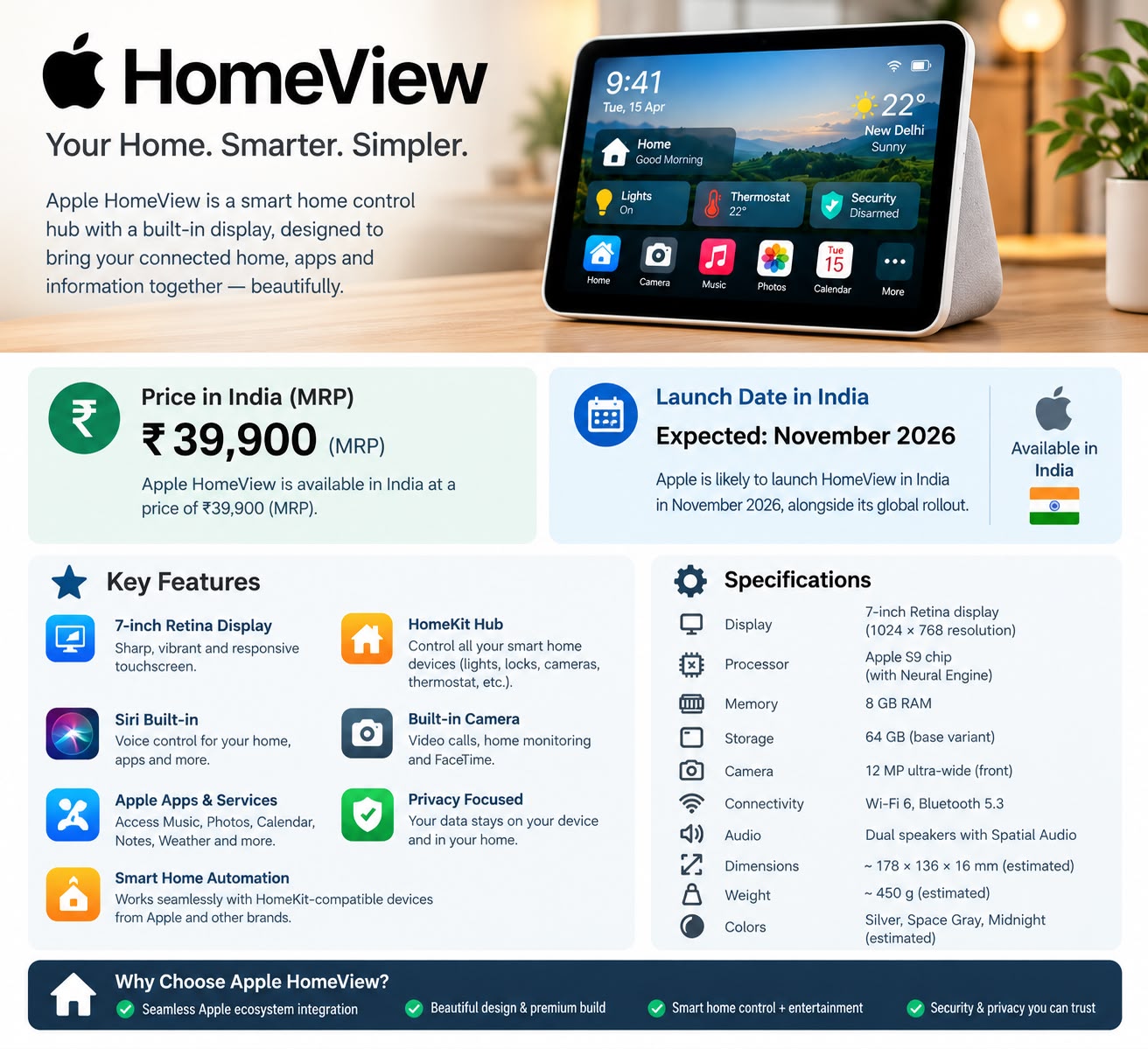
Apple HomeView Launch: Price in India, Features, Specifications and Everything You Need to Know
Apple HomeView has been announced as Apple's new smart home display, combining Siri AI, entertainment, video calling and home automation in a single device. Unveiled on October 13, 2026, the device is designed to become the central control point for a connected household, allowing family members to manage smart accessories, access personal information, make FaceTime calls and enjoy entertainment from one screen.
With a 7-inch Liquid Retina display, Apple's A18 chip and a personalised Siri AI experience, HomeView represents a significant expansion of Apple's smart home ambitions. The device is designed to work closely with the iPhone, iPad and Apple Home ecosystem while keeping individual users' information separate.
In India, Apple has listed HomeView at INR 39,900, with availability scheduled to begin on November 13, 2026. The company is also offering a wall-mounted version for the same listed price.
Apple HomeView: Key Highlights
- Product: Apple HomeView
- Announcement date: October 13, 2026
- India price: INR 39,900
- Availability: November 13, 2026
- Display: 7-inch Liquid Retina touchscreen
- Processor: Apple A18
- AI assistant: Siri AI powered by Apple Intelligence
- Camera: 12MP Centre Stage camera
- Audio: Built-in speaker system with Spatial Audio support
- Personalisation: Recognition for up to six people
- Models: Standard tabletop and wall-mounted versions
- Colours: Silver, Starlight, Rose Pink and Space Grey for the standard model
Apple HomeView Price in India and Availability
Apple HomeView has been listed on Apple's Indian online store at INR39,900, including applicable taxes. The wall-mounted version is also listed at INR39,900, although its mounting hardware and power requirements should be considered separately when calculating the total installation cost.
Pre-orders began on October 13, 2026, while general availability is scheduled for November 13, 2026.
|
Detail |
Information |
|
Standard model |
INR 39,900 |
|
Wall-mounted model |
INR 39,900 |
|
Monthly EMI |
Starting at INR3,620, subject to applicable terms |
|
Announcement |
October 13, 2026 |
|
Availability |
November 13, 2026 |
|
Purchase channels |
Apple India online store, Apple Store app and selected partners |
Buyers should check Apple's official store for current stock, delivery dates, mounting accessories and payment offers.
What Is Apple HomeView?
Apple HomeView is a smart display designed to combine several functions that would otherwise require different devices or applications.
It can display photos, play music, show supported video content, facilitate FaceTime calls and provide a central interface for controlling compatible smart home accessories. Its built-in Siri AI assistant also allows users to interact with the device using voice commands.
Unlike a conventional tablet, HomeView is designed primarily for shared spaces such as living rooms, kitchens, bedrooms and hallways. Its interface can display information relevant to the household, while personal information is tailored to recognised users when the necessary accounts and compatible devices are configured.
Apple's approach focuses on three main areas: personalisation, connected-home management and privacy.
Design and Display: A Compact Smart Home Screen
Apple HomeView features a 7-inch Liquid Retina display intended for everyday viewing and interaction. It can display information such as calendars, weather, photographs, music controls and compatible smart home accessories.
The standard model features a domed aluminium base with a stainless-steel hinge that allows the display to be adjusted for a more comfortable viewing angle.
Its customisable screen designs are another major attraction. Users can select a photo-focused interface, calendar information or other supported visual experiences to match the room and their daily routines.
The device is available in Silver, Starlight, Rose Pink and Space Grey. The wall-mounted model is offered in Silver and Space Grey.
Wall-Mounted Version
Apple is also offering HomeView in a wall-mounted configuration for users who prefer a fixed installation.
This version is intended for areas such as entrances, hallways and kitchens, where the screen can provide quick access to home controls, selected camera feeds and household information.
Depending on the installation, buyers can choose from compatible plug-in or hardwired mounting solutions. The appropriate power arrangement and mounting accessories should be confirmed before installation.
A wall-mounted smart display may be particularly useful for households that want a dedicated control point without occupying a desk or countertop.
Siri AI and Apple Intelligence: The Biggest Feature
The most important feature of Apple HomeView is its integration with Siri AI, powered by Apple Intelligence.
Rather than functioning solely as a voice-command interface, Siri AI is designed to provide more personalised assistance by using supported information from compatible Apple devices and applications.
For example, users can ask Siri to help find a calendar invitation, locate information in Messages, set reminders or answer general questions. When a compatible Apple Intelligence-enabled iPhone or iPad is paired with HomeView, supported requests can draw on relevant personal context.
The assistant can also answer general questions, help with everyday tasks and support more natural follow-up conversations.
Apple says Siri AI will initially be available in English, and usage limits may apply. Buyers in India should therefore check the available language support before purchasing the device, particularly if they expect to use Hindi or another Indian language.
Personalised Experience for Different Family Members
HomeView can recognise up to six people and personalise supported experiences for each recognised household member.
This feature is designed to make a shared device more useful. One person may see their calendar and reminders, while another can access their own supported content and preferences.
To unlock the full personalised experience, users need an Apple Account, a compatible iPhone or iPad and membership in the shared home configured through the Home app.
Guests and unrecognised users can still use supported general features, such as controlling compatible accessories, checking the weather, setting timers and playing music, without accessing another person's personal information.
Smart Home Automation and Device Control
Apple HomeView is designed to function as a central dashboard for compatible smart home accessories.
Through the Apple Home app, users can control supported lights, switches, thermostats, locks and other connected devices. They can also create scenes and automation routines to coordinate multiple accessories.
For example, a morning routine could switch on selected lights and adjust a compatible thermostat. An evening routine could turn off lights, check supported door locks and activate selected security settings.
The device also allows users to monitor compatible security cameras and view activity from their entryway.
Multiple Camera Feeds on One Screen
One notable feature is the Home Camera interface, which can display up to nine video feeds simultaneously.
This could be useful for households with several compatible cameras covering different areas, such as an entrance, living room, driveway or backyard.
Instead of opening a separate application on a phone, users can check supported camera feeds directly on the HomeView display.
The available functionality depends on compatible accessories, camera configurations, software and supported Home app integrations.
Smart Home Safety Notifications
HomeView can detect sounds from compatible smoke and carbon monoxide detectors and send alerts to supported Apple devices, including an iPhone, iPad or Apple Watch.
The Home app can also use Apple Intelligence to group related notifications and provide descriptions of supported security-camera footage.
These features can help household members review important activity more efficiently. However, users should continue to maintain dedicated safety equipment and follow the manufacturer's instructions for smoke and carbon monoxide detection.
FaceTime and Video Calling
Apple HomeView includes a 12MP Centre Stage camera designed for video calls.
Centre Stage helps keep participants centred in the frame as they move around or when additional people join the conversation. This makes the device suitable for family calls, casual conversations and supported video meetings from shared spaces.
The camera is positioned above the display, allowing the screen to function as a dedicated video-calling device rather than requiring users to hold a phone or tablet.
For households already using FaceTime, the integration could make video communication more convenient, particularly in kitchens and living rooms where several family members may want to participate.
Music, Movies, Podcasts and Photos
HomeView is also designed as an entertainment device.
Apple's product information highlights support for music, podcasts, audiobooks, TV content, photos and other compatible media. The display can show album artwork, lyrics and visual content while playing supported audio.
Built-In Photo Frame
The Photos interface allows users to display individual images or rotating galleries from supported photo collections and shared albums.
This turns HomeView into a digital photo frame when it is not being used for smart home controls or video calls.
Users can personalise the screen to suit the room, making the device both a functional household display and a decorative element.
Handoff Between Apple Devices
HomeView supports Handoff for compatible activities, allowing users to start supported music, podcasts, calls, videos or recipes on an iPhone and continue on HomeView.
This feature is designed to make movement between personal devices and shared household screens more seamless.
Audio Performance and Speakers
Apple has designed HomeView's audio system to deliver room-filling sound for music, podcasts and video calls.
The standard model combines a down-firing woofer with two full-range drivers. Computational audio adjusts loudness and bass response based on operating conditions and built-in sensor information.
The system also supports Spatial Audio for compatible content.
The wall-mounted version uses two custom drivers and audio processing tuned for its installation style.
These audio features mean HomeView is intended to do more than provide voice responses. It can also serve as a compact entertainment speaker in a bedroom, kitchen or living room.
Privacy and Security: How Apple Protects Personal Information
Privacy is particularly important for a device that may remain switched on in a shared household and have access to personal information, cameras and microphones.
Apple says HomeView is designed to keep personal information protected and separate between household members. The A18 chip supports on-device processing, while Apple Intelligence can use Private Cloud Compute for supported requests that require additional processing.
Apple states that Private Cloud Compute is designed to process relevant information without storing it or making it accessible to Apple.
Personalisation also depends on recognising the correct household member and connecting the appropriate Apple Account and supported device.
Before setting up HomeView, users should review camera and microphone permissions, home-sharing access, account security and the permissions granted to connected accessories.
Apple HomeView Specifications
|
Specification |
Details |
|
Display size |
7 inches |
|
Display technology |
Liquid Retina |
|
Processor |
Apple A18 |
|
AI platform |
Apple Intelligence |
|
Voice assistant |
Siri AI |
|
Camera |
12MP Centre Stage |
|
Microphones |
Four beamforming microphones |
|
Standard-model audio |
Down-firing woofer and two full-range drivers |
|
Wall-mounted audio |
Two custom drivers |
|
Spatial Audio |
Supported |
|
User recognition |
Up to six people |
|
Camera dashboard |
Up to nine video feeds |
|
Standard colours |
Silver, Starlight, Rose Pink, Space Grey |
|
Wall-mounted colours |
Silver, Space Grey |
|
India price |
INR39,900 |
|
Availability |
November 13, 2026 |
Specifications are based on Apple's published product information. Feature availability may depend on software, region, account configuration and compatible accessories.
Apple HomeView vs Amazon Echo Show vs Google Nest Hub
Apple HomeView enters a market where Amazon and Google already offer smart displays for household control, voice assistance and entertainment.
|
Feature |
Apple HomeView |
Amazon Echo Show |
Google Nest Hub |
|
Main ecosystem |
Apple |
Amazon Alexa |
Google Home |
|
Voice assistant |
Siri AI |
Alexa |
Google Assistant and available Gemini features, depending on model |
|
Personalisation |
Apple Account and compatible devices |
Alexa account and supported profiles |
Google account and supported profiles |
|
Video calling |
FaceTime |
Supported services vary by model |
Features vary by model |
|
Smart home management |
Apple Home |
Alexa-compatible accessories |
Google Home-compatible accessories |
|
Main advantage |
Deep Apple ecosystem integration |
Alexa ecosystem and supported services |
Google services and compatible home controls |
The exact comparison depends on the Echo Show or Nest Hub model and the features available in the user's country.
HomeView's strongest selling point is its integration with Apple devices and its personalised household experience. However, buyers with mixed-device households should carefully check accessory compatibility before committing to Apple's ecosystem.
What's Hot
-

India WTC Final 2027 Qualification Chances: What Team India Needs
-

India Score 720/9 vs New Zealand: Highest Away Test Total, Historic Record
-

Georgia Beats South Carolina 34-6 to Clinch 2026 SEC Championship Berth
-

PM E-DRIVE Scheme Crosses 30 Lakh EV Sales Milestone
-

PM Modi's FICCI Speech 2026: Listen to Gandhi, Promote Swadeshi and Make India Self-Reliant
-

Trump, Xi and Putin Summit 2026: Key Agenda, Nuclear Weapons, Iran War and Ukraine
-

EV Sales Surge 69% in India During 2026 Festive Season
-

What Is ASEAN? 11 Member Countries and Why It Matters to India
-

India vs New Zealand 4th ODI: India Bowled Out for 89, Lose by 244 Runs
-

PM Modi to Launch Rs.15,600 Crore Development Projects in Bengaluru Today